

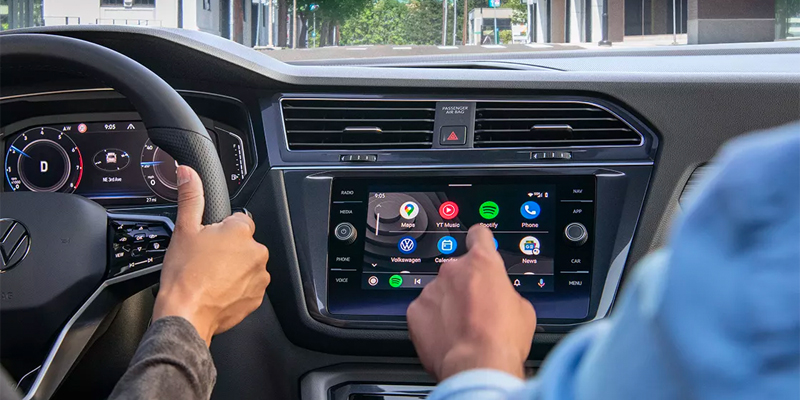
Driving a 2026 Volkswagen without Apple CarPlay® is like storming the highway with a paper map, a busted radio, and blind faith in destiny. CarPlay® is the nerve center — the interface between you, your phone, and the chaotic sprawl of highways around Longview, TX. It keeps the madness organized.
This isn’t luxury tech. It’s basic equipment for staying sane behind the wheel.
What Apple CarPlay® Actually Does — And Why You’ll Miss It If It’s Gone
Apple CarPlay® mirrors your iPhone onto your Volkswagen’s infotainment screen, turning the dash into a command post. Maps, music, messages, calls — all routed through the car, all controllable by voice or steering-wheel buttons.
Instead of fumbling with a phone at 70 mph like a lunatic, CarPlay® keeps your eyes forward and your hands where they belong. In 2026 Volkswagen models — including Tiguan, Atlas, Taos, and Jetta — it’s either standard or easily enabled, and once you use it, there’s no going back.
How to Connect Apple CarPlay® in a 2026 Volkswagen
Setting it up doesn’t require a tech degree or a blood sacrifice. Follow this once and you’re done.
First, make sure your iPhone is updated to the latest iOS and that Siri is turned on. CarPlay® won’t work without it, and it won’t explain itself.
Next, connect your phone. Some 2026 VW models support wireless CarPlay®, others use a USB connection. If you’re plugging in, use a quality cable — cheap cords cause chaos. For wireless setups, Bluetooth and Wi-Fi need to be active.
Once connected, your Volkswagen’s infotainment screen will prompt you to enable Apple CarPlay®. Accept it. Grant permissions on your phone. That’s the handshake.
After that, the Apple interface appears on the screen. Navigation, music, messages — all ready for deployment.
What You Can Do with Apple CarPlay® Once It’s Live
CarPlay® turns the cabin into a rolling control room.
Navigation apps like Apple Maps or Google Maps deliver live traffic updates and reroutes without drama. Siri reads texts aloud and sends replies so you don’t have to look down and tempt fate. Music and podcasts stream through the sound system without lag or fumbling. Calendar alerts pop up so you don’t forget where you’re supposed to be — or why you’re late.
It’s not flashy. It’s functional. And that’s the point.
When Things Go Sideways (Troubleshooting Without Losing Your Mind)
If CarPlay® doesn’t connect, don’t panic.
Check the obvious first: Bluetooth, Wi-Fi, and cable quality. Restart your iPhone. Restart the infotainment system. Update software on both ends.
If wireless CarPlay® acts possessed, switch to a wired connection and reset network settings on your phone. Nine times out of ten, that fixes it.
If the problem persists, it’s time to bring in professionals who’ve seen this movie before.
Get Help From People Who Actually Know Volkswagens
If Apple CarPlay® isn’t behaving or you want a walkthrough that doesn’t feel like a lecture, the team at Gorman McCracken VW can handle it quickly — no guesswork, no nonsense.
They’ll make sure your 2026 Volkswagen is talking to your iPhone the way it should, so you can get back to driving instead of arguing with a touchscreen.
Get More Out of Your Volkswagen
Apple CarPlay® isn’t an extra. It’s a tool — one that keeps your drive organized, your attention forward, and your phone where it belongs.
If you’re driving a 2026 Volkswagen in Longview, TX and haven’t dialed this in yet, stop by Gorman McCracken VW. They’ll get you connected, configured, and back on the road — fully wired, fully aware, and ready for whatever the highway throws next.
Connect with us


- 2025 Volkswagen Golf GTI
- 2025 Volkswagen ID.4
- 2025 Volkswagen ID.4 Features
- 2025 Volkswagen Taos
- 2025 VW Jetta
- 2026 Atlas Cross Sport
- 2026 Atlas Cross Sport Longview, TX
- 2026 Fuel-Efficient VW
- 2026 Fuel-Efficient VW Models
- 2026 Hatchbacks
- 2026 Volkswagen Atlas
- 2026 Volkswagen Financing vs Leasing
- 2026 Volkswagen Golf GTI
- 2026 Volkswagen Golf GTI vs. Golf R
- 2026 Volkswagen ID.4 Charging
- 2026 Volkswagen ID.4 Range
- 2026 Volkswagen Jetta Trim Levels
- 2026 Volkswagen Jetta vs. 2026 VW Jetta GLI
- 2026 Volkswagen Taos
- 2026 Volkswagen Taos vs. 2026 Volkswagen Tiguan
- 2026 Volkswagen Tiguan Safety
- 2026 Volkswagen Tiguan Tech
- 2026 VW Apple Charging
- 2026 VW Hatchbacks
- 2026 VW iPhone Charging
- 2026 VW Jetta GLI
- 2026 VW Jetta Longview, TX
- 2026 VW phone technology
- 2026 VW SUVs
- 2026 VW Taos Trim Levels
- 2026 VW Tiguan
- 2026 VW Tiguan Longview, TX
- 2026 VW Tiguan Trim Levels
- 2026 VW Warranty
- 2026 VW Warranty Coverage
- 2026 VW Warranty Enhancements
- Austin TX Volkswagen Golf GTI
- Austin TX Volkswagen ID.4
- Austin TX VW Dealer
- Auto Loan Longview, TX
- Auto Suspension Tips
- Best 2026 Volkswagen SUVs for Growing Families
- Best Road Trip VW
- Best Volkswagen Vehicles for College Students
- Brake Repair Longview, TX
- Brake Replacement Longview, TX
- Car Suspension Service Austin TX
- Car Suspension Service Longview TX
- Certified Pre-Owned Volkswagen
- Check Engine Light Longview, TX
- CPO Cars Longview, TX
- Custom VW Order Longview, TX
- Engine Air Filter Longview, TX
- Fuel-Efficient Cars Longview, TX
- Fuel-Efficient VW Longview, TX
- Gorman McCracken Volkswagen
- Gorman McCracken Volkswagen Service
- How To Connect Your Android To Your VW
- How To Connect Your iPhone To Your VW
- How to Know When Your VW Needs a Suspension Check
- How to Use Apple CarPlay in Your Volkswagen
- Longview TX Volkswagen Golf GTI
- Longview TX Volkswagen ID.4
- Longview Used Cars
- Longview Volkswagen Dealer
- Longview Volkswagen Service
- Longview, TX 2026 VW Atlas
- Longview, TX Volkswagen Golf GTR
- Longview, TX VW Atlas
- Longview, TX VW Taos
- New Car Test Drive in Longview, TX
- New SUVs Longview, TX
- New Volkswagen Golf GTI
- New Volkswagen ID.4
- New VW Lease Longview, TX
- Oil Change Longview, TX
- Tire Rotation Longview, TX
- Tire Shop Longview, TX
- Uncategorized
- Used SUVs Longview, TX
- Volkswagen Custom Order
- Volkswagen Service
- Volkswagen Taos Austin, TX
- Volkswagen Tire Check Longview, TX
- VW Atlas Cross Sport Longview, TX
- VW Brake Tips
- VW Brakes
- VW Brakes Longview, TX
- VW Carefree Coverage Warranty
- VW Carefree Coverage Warranty Longview, TX
- VW Cargo Carriers
- VW College Grad Discount Longview, TX
- VW College Grad Program
- VW College Grad Program Longview, TX
- VW CPO Benefits
- VW CPO Cars Longview, TX
- VW Engine Air Filter
- VW Engine Air Filter Replacement Longview, TX
- VW Engine Longview, TX
- VW Finance Department Longview, TX
- VW Finance Longview, TX
- VW Golf GTI
- VW Hatchbacks Longview, TX
- VW Infotainment System and Technology
- VW interior screen
- VW Jetta Austin, TX
- VW Jetta Longview, TX
- VW Loan Austin, TX
- VW Loan Longview, TX
- VW Maintenance Austin TX
- VW Maintenance Habits
- VW Maintenance Longview TX
- VW Maintenance Tips
- VW Needs a Suspension Check
- VW Needs a Suspension Longview, TX
- VW Oil Change
- VW Oil Change Longview, TX
- VW Roof Racks
- VW Roof Racks Longview, TX
- VW Service Center Longview, TX
- VW Summer Road Trips
- VW Suspension Service Austin TX
- VW Suspension Service Longview TX
- VW SUVs
- VW SUVs Longview, TX
- VW Taos Longview, TX
- VW Test Drive in Longview, TX
- VW Tiguan Longview, TX
- VW Wireless Charging
- What to Do When Your Check Engine Light Comes On
- What to Do When Your VW Check Engine Light Comes On